When you click on links to various merchants on this site and make a purchase, this can result in this site earning a commission. Affiliate programs and affiliations include, but are not limited to, the eBay Partner Network.
Highest quality HDMI™converter module available for the original Xbox®!
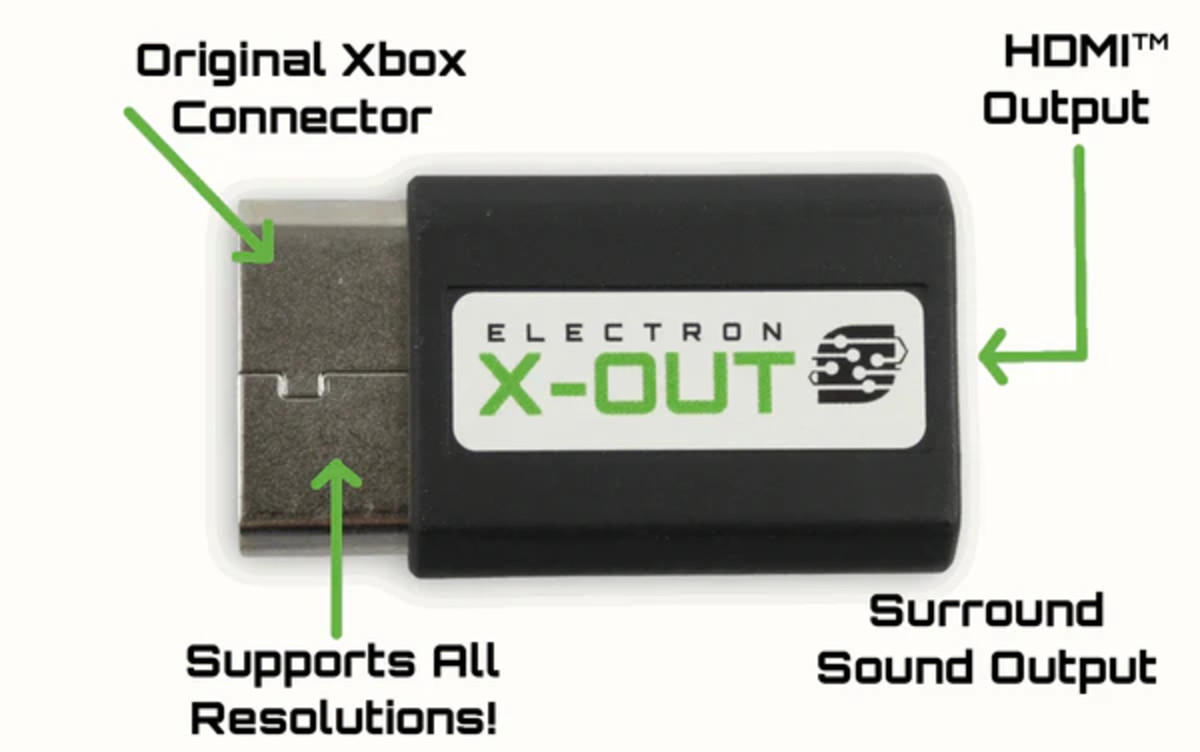
This tiny, power-packed module takes in the Component video and audio output from the Original Xbox®and outputs an HDMI™ signal with embedded Dolby Surround Sound (if that audio setting is enabled in your Xbox’s settings). Unlike other converters on the market, the ElectronXout is compatible with all versions of the Original Xbox!
This module utilizes a fully custom, made-in-the-USA PCB with a higher quality, next generation IC compared to the widely available, made-in-China, low qualityanalog-to-digitalmodules that are available online.
The low quality construction of the China-made modules often leads to video and audio loss and interference.
FEATURES
These modules are not compatible with the Xbox 360 -- These modules are only compatible with the Original Xbox (all versions).
This module efficiently supports all of the resolutions that are default to the Original Xbox.
NTSC Consoles --480i, 480p, 720p, 1080i.
PAL Consoles --576i.
These modules also utilize embedded Digital Surround Sound audio over theHDMI™ signal which is perfect for achieving surround sound with the proper receivers/TV and speakers.
Latest Version (V3).
SPECIFICATIONS
Size: 2.28" x 1.30" x .50" (58mm x 33mm x 12.6mm)
Supply Voltage: 5V (provided by Xbox output port)
Video Input: Component
Audio Input: Digital Surround Sound
Video/Audio Output: HDMI™
Compatibility: NTSC and PAL (all resolutions are supported!)
Latest Version (V3)
Latency: LAG FREE!!
SPECIAL INSTRUCTIONS
This module utilizes the Dolby Surround Sound audio from the Original Xbox. Make sure your Xbox's audio settings are set as follows (otherwise audio will not work):
**Audio Mode -- Dolby Surround
**Dolby Digital -- Disabled
**DTS -- Disabled
DEBUG STEPS
When using the ElectronXout, some customers have reported seeing wavy lines across the image, green/purple stripes, or vertical jailbars. Here are some examples of these image problems and ways to solve them.
Often times these image problems do not appear with the "normal" Xbox cables since those utilize Composite (CVBS) video - you can tell they are Composite cables if they use yellow, white, and red RCA jacks. The ElectronXout utilizes the higher fidelity Component (YPbPr) video which is a different video signal from CVBS altogether.
Type 1 -- Wavy Lines or Green/Purple Stripes
If your Xbox is exhibiting this type of behavior, more often than not the image quality can be improved significantly by replacing the main electrolytic capacitors on the power supply unit (PSU). The specific capacitors to replace vary for every PSU version and that information can be readily found online.
Type 2 -- Jail Bars
Some consoles have been known to produce faint jail bars in the image that are picked up and displayed by the high quality converter inside of the ElectronXout.
These consoles can also benefit from capacitor replacements as described above, but also forcing the system to output a 480p resolution instead of a 480i resolution has been known to solve this problem. That can typically be done by "soft modding" your console via the various methods found across the web.
You can also try the following (suggested by @Batpixel on YouTube) --While on the Xbox dashboard, hold the left trigger and right trigger at the same time and click the left & right stick at the same time. This 4-button combo forces the Xbox into 'component mode' for 480p instead of 480i. This can instantly get rid of jail bars if your console is displaying 480i.
If that does not work, then you have an "old" version of the dashboard. You can put in a Xbox Live game in your Xbox (such as Star Wars: Battlefront 2) and it will install the dashboard update which will allow the above-shown option to work.
NOTE
HDMI cable is not included.
WARNING
The Electron X-Out Xbox HDMI Adapter is only compatible with the original Xbox -- It is not compatible with any other Xbox units.