When you click on links to various merchants on this site and make a purchase, this can result in this site earning a commission. Affiliate programs and affiliations include, but are not limited to, the eBay Partner Network.
- Store
- New Arrivals
- Add to Favorite
- View response
- Contact
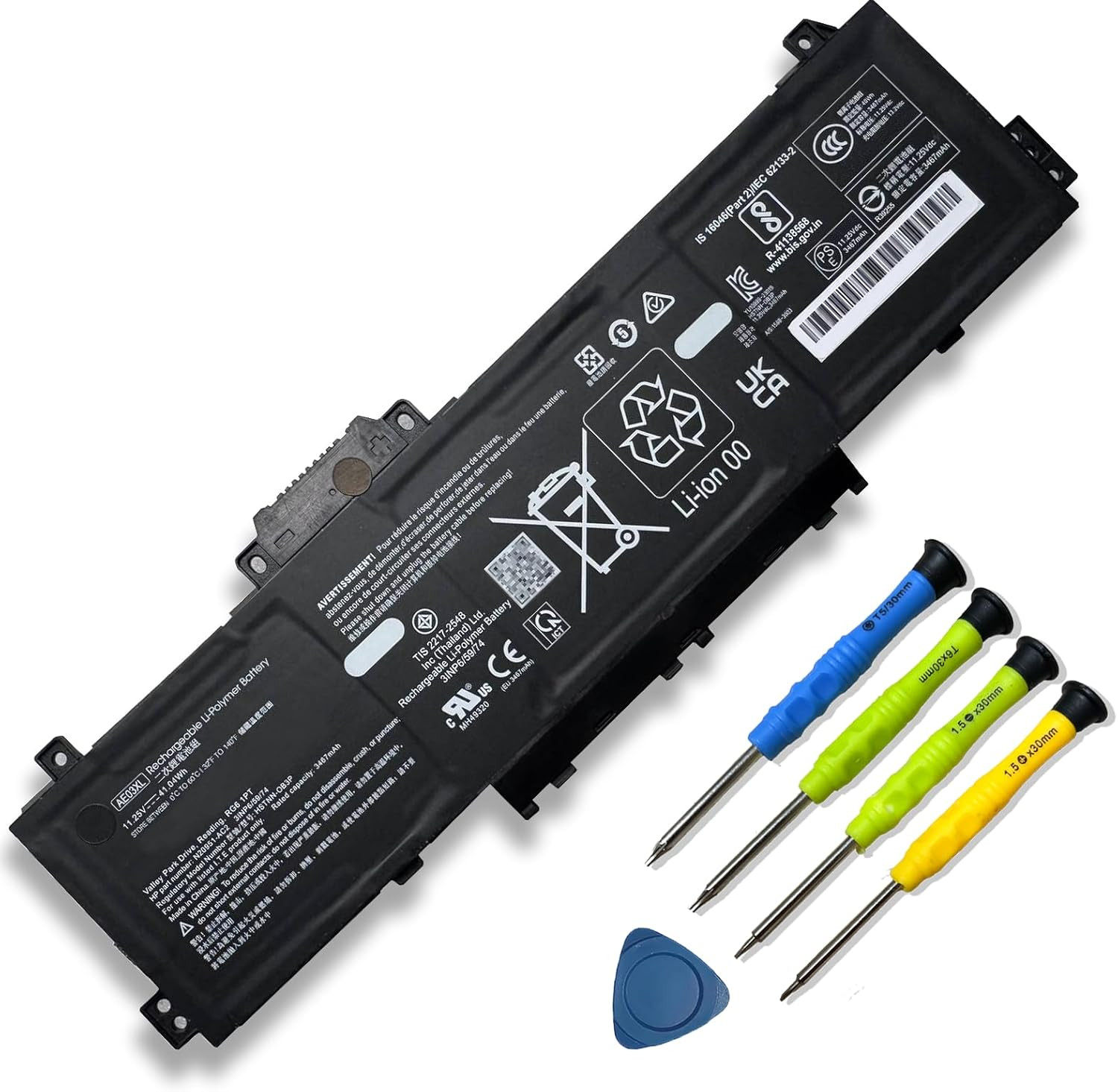
41.04Wh AE03XL N21969-005 Laptop Battery Replacement for HP 240 G10 245 246 250 255 256 G10 14-EE 14-EM 14Z-EM 14-EP 15-FC 15-FD Series HP 15 A11U A11UD GF66 11UD GF76 Pulse HSTNN-WB0D 11.25V 3467MahDescription Reusability Rechargeable Battery Capacity 41.04 Milliamp Hours Warranty Description 1 Year Antenna Location Laptop Battery Cell Composition Lithium Ion Battery Cell Type Lithium Ion Model Number AE03XL Battery Weight 210 Grams Model Name AE03XL Recommended Uses For Product Laptop Number of Batteries 1 A batteries required. Compatible Phone Models ①Fit For HP 245 G10 Series;②For HP 246 G10 Series;③Fit For HP 250 G10 Series;④Fit For HP 255 G10 Series;⑤Fit For HP 256 G10 Series;⑥Fit For HP 14-EE Series;⑦Fit For HP 14-EM Series;⑧Fit For HP 14-EP Series;⑨Fit For HP 15-FC Series;⑩Fit For HP 15-FD Series Size 5.81*1.92*0.31 inch AE03XL
- 【Customer First】24 x 7 email support. We specialize in providing quality power products and quality customer service. (Note: Amazon return windows will close after one month, If you have any problem with battery, please Contact us - in “YOUR ORDER” options click the “contact seller”.)
- 【Tech Specs & 100% New Products】①Model: AE03XL ②Voltage: 11.25V; ③Capacity: 41.04Wh/3467mAh; ④Battery type: Li-ion. (We only use grade A battery cells that provide up to 500 recharge cycles over the life of the battery. Come with screwdrivers.)
- 【Compatible Part Number】AE03XL, N21969-005, N2095-AC1, HSTNN-OB3E, HSTNN-0B3E, TPN-DB1N
- 【Replacement For Laptop】①Fit For HP 245 G10 Series;②For HP 246 G10 Series;③Fit For HP 250 G10 Series;④Fit For HP 255 G10 Series;⑤Fit For HP 256 G10 Series;⑥Fit For HP 14-EE Series;⑦Fit For HP 14-EM Series;⑧Fit For HP 14-EP Series;⑨Fit For HP 15-FC Series;⑩Fit For HP 15-FD Series
- 【Security】All Mobik products are certified by UL / CE / FCC / RoHS for safety. We’re so confident in the performance of our replacement laptop batteries, strict guidelines for compatibility, strict quality control standards and standards compliance for environment safety. (including short circuit, overheat, and overload protections.)
- 【Tips】If the new battery is not recognized during the initial installation, please reinstall and check if the interface is fully connected. Discharge the new battery to 5% (not 0%), then charge and cycle 3-4 times to wake up the new battery.
Product description
How to purchase batteries correctly?
Method 1:You have to find your specific laptop model before ordering a correct battery.
How to check your laptop model?
Press [Win] + [R] , input "msinfo32" , then click "OK" to find your system model in the pop-up window.
Method 2:Take the battery out of your computer, confirm your original battery model and appearance, compared with our battery image, make sure that's what you need.
AE03XL
About Mobik
Mobik is a professional manufacturer of laptop batteries, committed to creating high quality batteries and bringing our customers very cost-effective products. We strictly control the quality of our products and our batteries meet or exceed OEM standards, you can rest assured that shopping with us is safe and reliable.
- Up to 1000+ recharge cycles
- Easy to install
- Safe use anytime
- Reliable performance
Mobik AE03XL Battery for HP Specifications:
- Model: AE03XL
- Voltage: 11.25V
- Capacity: 41.04Wh/3467mAh
- Battery Type: Rechargeable Lithium-ion Battery
- Contion: 100% New from Manufacturer, Grade A Cell
Package included:
1* battery + 1* instruction manual + 1* screwdriver kit
- High-quality materials and circuit board
- 100% compatible to meet OEM specifications
- Longer Discharge Time & Quicker Charging
- Long battery life & lower power consumption
- Short circuit, overheat & overload protection
Replacement Part Number:
- AE03XL AE03041XL AE03041XL-PL HSTNN-AB1B HSTNN-OB3E HSTNN-WB0D
- 78H64AV 78U71AV N21969-005 N20951-171 N20951-1B1 N20951-2D1 N20951-2E1
- N20951-AC1 N20951-B71 N20951-CC1 TPN-IB0R TPN-IB0S TPN-DB1N TPN-DB1M
Compatible Models (use "Ctrl+F" to find your model quickly")
- Fit for HP 240 G10 Series;
240 G10 834B2PA / 240 G10 834B3PA / 240 G10 834B4PA / 240 G10 85A19EA/240 G10 834B5PA / 240 G10 834U9PA / 240 G10 836J6PA / 240 G10 84L00PA/240 G10 836J8PA / 240 G10 836M6PA / 240 G10 84K99PA For HP 245 G10
- Fit for HP 245 G10 Series
- Fit for HP 246 G10 Series
- Fit for HP 250 G10 Series
- Fit for HP 255 G10 Series
- Fit for HP 256 G10 Series
- Fit for HP 14-EE Series
14-EE0010NR/14-EE0016CA/14-EE0016CA
- Fit for HP 14-EM 14Z-EM Series;
- Fit for HP 14-EP 14T-EP Series;
- Fit for HP 15-FC 15Z-FC Series;
- Fit for HP 15-FD 15T-FD Series;
Safety
All Mobik products are certified by UL / CE / FCC / RoHS for safety. Every one of our replacement notebook batteries are tested to meet or exeed OEM specifications.
Multiple built-in protections
Each battery include multiple built-in protections such as overheating, overcurrent and overload protection for maximum safety.
Perfect Fit
All our batteries are 100% brand new, We offer new generation laptop batteries with Grade A cells, real capacity, long lasting and low power consumption.
Laptop Batteries Maintenance Tips:
New battery:With a new battery, you'd better discharge it to 5%(not 0%) and charge up to 95%.Then cycle 3-4 times to wake up the new battery.
Overuse: Do not always run out of a battery to 0%, this would make it damaged or usage life shortened. Please recharge immediately when the battery reduced to 5%.
Long-term storage:If you remove battery for a long time, it is important to cycle it (discharge => charge) regularly, at least once a month. Please store the unused battery fully charged. Do not store at low power to prevent reduce the lifespan of a battery.
Charging sequence: when charging, first install the battery, then turn on the power, when fully charged, first cut off the power, then pull the power plug.
Installation Suggestion:
- You need to turn off your laptop and disconnect the power.Turn the laptop to the back, install a new battery, and fix it with a tool.
- Battery Installation is easy, you can search for the video about laptop battery or just find a repair technician for help.
- Avoid artificial shocks, disassembly, crush or puncture. Do not dispose of it in fire or water.
- Do not connect adapter for a long time while using the battery. It may damage the battery.
Battery Troubleshooting:
1.Maybe it is caused by a loose battery, please remove the battery and reinstall it again.
2.Maybe due to conductive material damaged which the laptop motherboard and battery anode and cathode contact position, you can try to confirm it with your original battery.
3.Check whether the battery drive is in normal condition, if not, download the corresponding driver software to update.
4.When the computer is turned on, if it is not recognised, it is recommended to update the BIOS settings or please disconnecting the old battery, and holding down the power button for 20 seconds, then connect the new battery.Try a few more times.